Both monitors would suddenly go black, if I had a YouTube video in the background playing it would continue for a couple seconds then eventually the audio would be cut. The computer would still visually be on by the lights on the computer but the OS in the background had definitely frozen up and no input was being given to the monitors. No other choice than to force a power turn off by holding the power button. This happened many more times throughout the next couple of days, same thing over again.
I suspected the first thing it may be is my GPU due to the monitors going black. Typically monitors going black stem from issues with the GPU. Some solutions I tried immediately was updating my graphics drivers and running “sfc /scannow” and “DISM /Online /Cleanup-Image /RestoreHealth” in command prompt to see if I had any corrupted, missing, or modified windows files. I also decided to just scan the system RAM for any issues using Windows built-in program Windows Memory Diagnostic. I tried to also check Event viewer but it did not really give any clear indications to what the issue could be in the logs it provided. None of these solutions worked and I continued experiencing the same problem over and over again.

Then randomly out of nowhere the same thing happened again but instead of monitors going black, I received a BSOD which I was actually happy about because it gave me an error code which was Stop Code: VIDEO SCHEDULER INTERNAL ERROR. This confirmed that it was an issue with specifically the graphics card. I installed HWiNFO for more information, checked for under volting, checked temperatures, stress-tested the GPU, and everything was fine in terms of temperatures which stayed below 65 C. Power looked consistent to the GPU and no crashes occurred during multiple stress test runs. Randomly one day my computer crashed again but luckily before it crashed I had started up HWiNFO logging prior to that because I knew that eventually my computer would crash again.
When the crash happened, the log shows that right before the crash the graphics card was at very low utilization so it crashing due to high utilization was off the possible reasons. Power voltage was stable, and temperature was also stable. None of these were the issue.
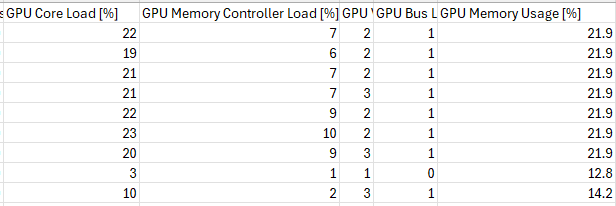
Many errors recorded on the .csv that was created and logged by HWiNFO. PCI Express error counters, receiver errors, Bad TLP Count, and LCRC Error counts.

The number of errors in the log shows that there are probably PCIe communication issues. Here is another log I recorded later which shows the error counts still increasing.
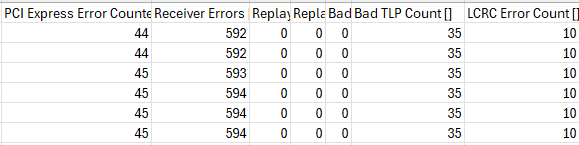
The operating system can’t manage the GPU if there is corruption and failure happening which can lead to the system crashing and showing BSOD. This was the reason I received the BSOD and the error code: VIDEO SCHEDULER INTERNAL ERROR. Many times, I received no BSOD and just the monitors going dark which can be caused by PCIe signal integrity and corruption issues. Receiving those black screens was probably the system trying to recover from the GPU or driver crash, while the BSOD was just my system stopping because the recovery failed and Windows had to stop to prevent damage.
Solution:
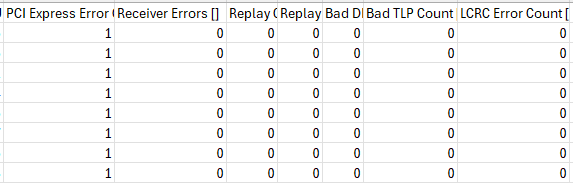
Reseating the graphics card fixed the problem. I also cleaned the entire computer to get rid of any dust or build up that could possibly get into the PCIe slot. What most likely caused the errors is the dust somehow got into the PCIe slot and was disturbing the connection between the graphics card and the motherboard. After I cleaned out the computer and reseated the graphics card there were no more errors that showed up on the new log I created. Down below is the log from my computer that was on for multiple hours after the reseating and cleaning of the graphics card and PCIe slot.