Crontab is a really useful tool for automation. It lets you schedule tasks and run scripts automatically by making entries in the crontab file. Here is the way crontab entries are structured:
(minute) (hour) (day_of_month) (month) (day_of_week) (command)
Crontab examples:
# runs every 10 minutes
*/10 * * * * /home/user/check_updates.sh
# runs at midnight on the 1st day of every month
0 0 1 * * /home/user/monthly_cleanup.sh
# runs every Friday at 6:15 PM
15 18 * * 5 /home/user/weekly_summary.sh
To enter the crontab:
crontab -eThis is a simple crontab entry that will send a message every 2 minutes and append it to a text file.
*/2 * * * * echo "Testing nodetechsystems" >> /home/user/node.txtWait 2 minutes and check the text file and you should see the message in there

To check crontab entries:
crontab -l
To remove all crontab entries:
crontab -r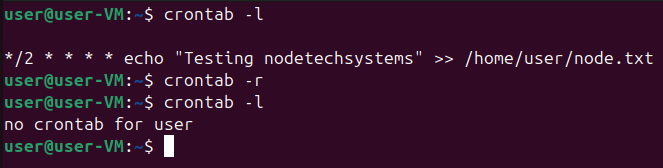
Each user has their own crontab, when you do crontab -e it opens your personal crontab file. Entries in this file run as that user with their permissions. There is also /etc/crontab and the /etc/cron.d/ directory which can include jobs for any users, but you must specify which user will run the command before the command. The /etc/crontab file acts as the system crontab. Usually, system admins edit this file to execute system critical processes at specific times.
You can view crontab entries from other users. This one is checking the user member if they have any crontab entries:
sudo crontab -u member -l
The “at “ command schedules one or more commands to be executed at a specific time in the future. You would need to keep using “at” over and over if you want to add more commands.
at 12:30 Dec 12Then when the prompt opens type:
echo “this is at test” >> /home/user/at-test.txtHit ctrl + d to save it then type this to view your jobs:
atqTo remove an entry you can use atrm (job number). You get the job number by running atq and looking to the left of the entry for a number:
atrm 5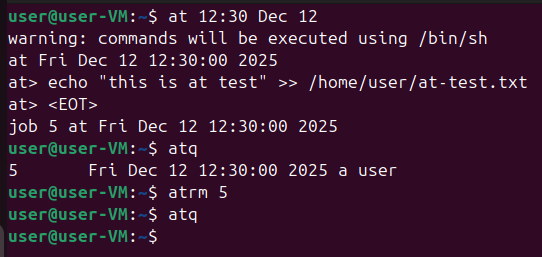
Those were the basics of the crontab and at commands. These tools allow you to schedule repetitive tasks or one-time jobs, manage backups, generate reports, and much more. Setting up automation in your system or environment can save a significant amount of time and effort in the long run.